
Jira Cloud
Audit Jira worklogs before invoicing.
Review Jira worklogs before invoicing or client reporting with scoped, read-only checks and traceable findings.
Who it’s for
Professional-services, delivery and finance teams reviewing Jira time records before invoicing or client reporting.
Findings are prompts for a human review, not a determination of whether a time entry is correct or billable.
The problem
A worklog total can look reasonable while individual entries still need a conversation before invoicing.
How it works
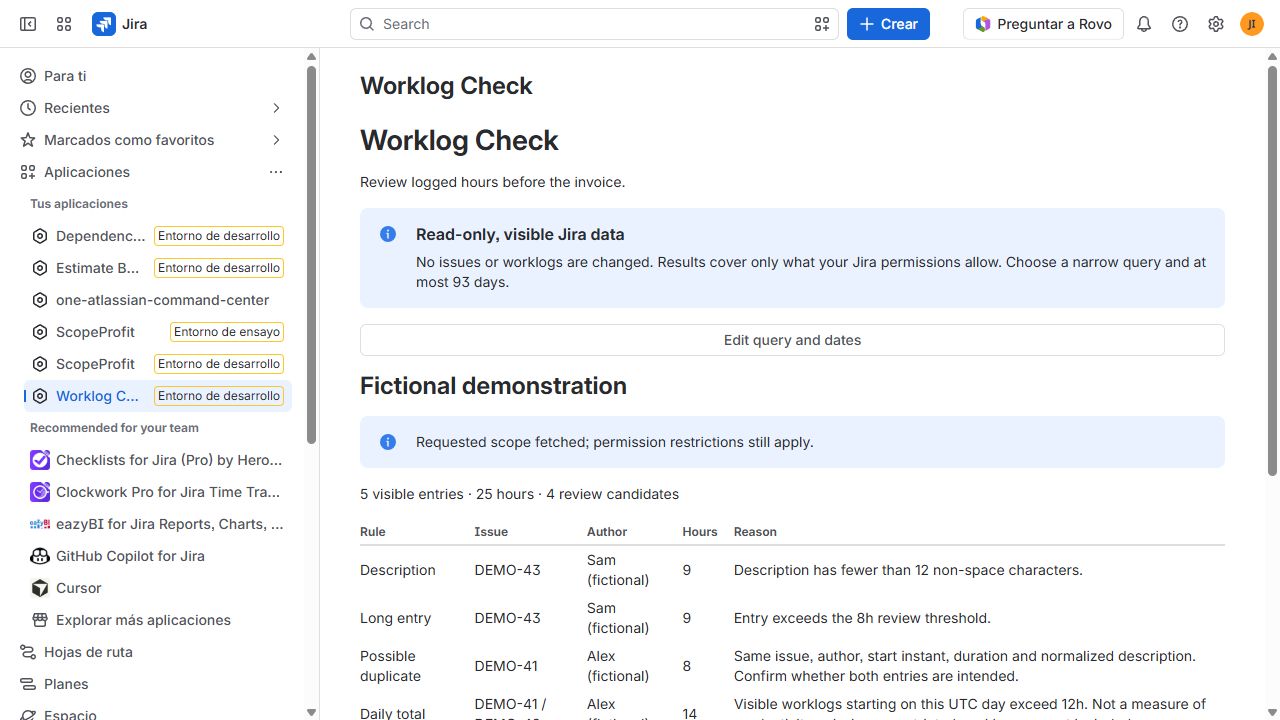
- Try the fictional demo, then choose a JQL scope and a period of 1–93 UTC days.
- Set review thresholds. Inspect matching entries, short descriptions, long entries, future starts and high visible daily totals.
- Review the underlying issue and worklog references with the team. Copy the CSV, including its period and coverage status, into your approved review process.
YOUR FIRST USEFUL RESULT
Complete a scoped review and open at least one candidate with its issue/worklog reference and reason so a reviewer can decide what to check. A flagged entry is a question for a person, not proof that the worklog is wrong.
Check the fit before installing
Read-only review of visible records. Up to 200 issues, 500 worklogs per issue and 10,000 worklogs overall. Candidates can be legitimate and can overlap. Their hours are not recovered revenue; the app does not approve invoices or score employees.
Trust and support
Check the current Marketplace listing for the app’s Privacy & Security status, permissions, pricing and supported platforms. Read the product-specific documentation and policies before installing. Contact support@irazustasoftware.com for help.
Common questions
Does a candidate prove that a worklog is wrong or billable?
No. Each rule surfaces a record for a human review. A candidate may be legitimate and can appear in more than one group.
Why might a review be incomplete?
Results are limited to records visible to your Jira permissions and the selected JQL/date scope, with documented issue and worklog caps. Check the coverage status before relying on an export.
Pricing & availability
Current price, taxes, trial terms and billing are shown on the marketplace listing and checkout. This website does not process orders.